

tensorPOS
Fast checkout that posts cleanly to Finance
Overview
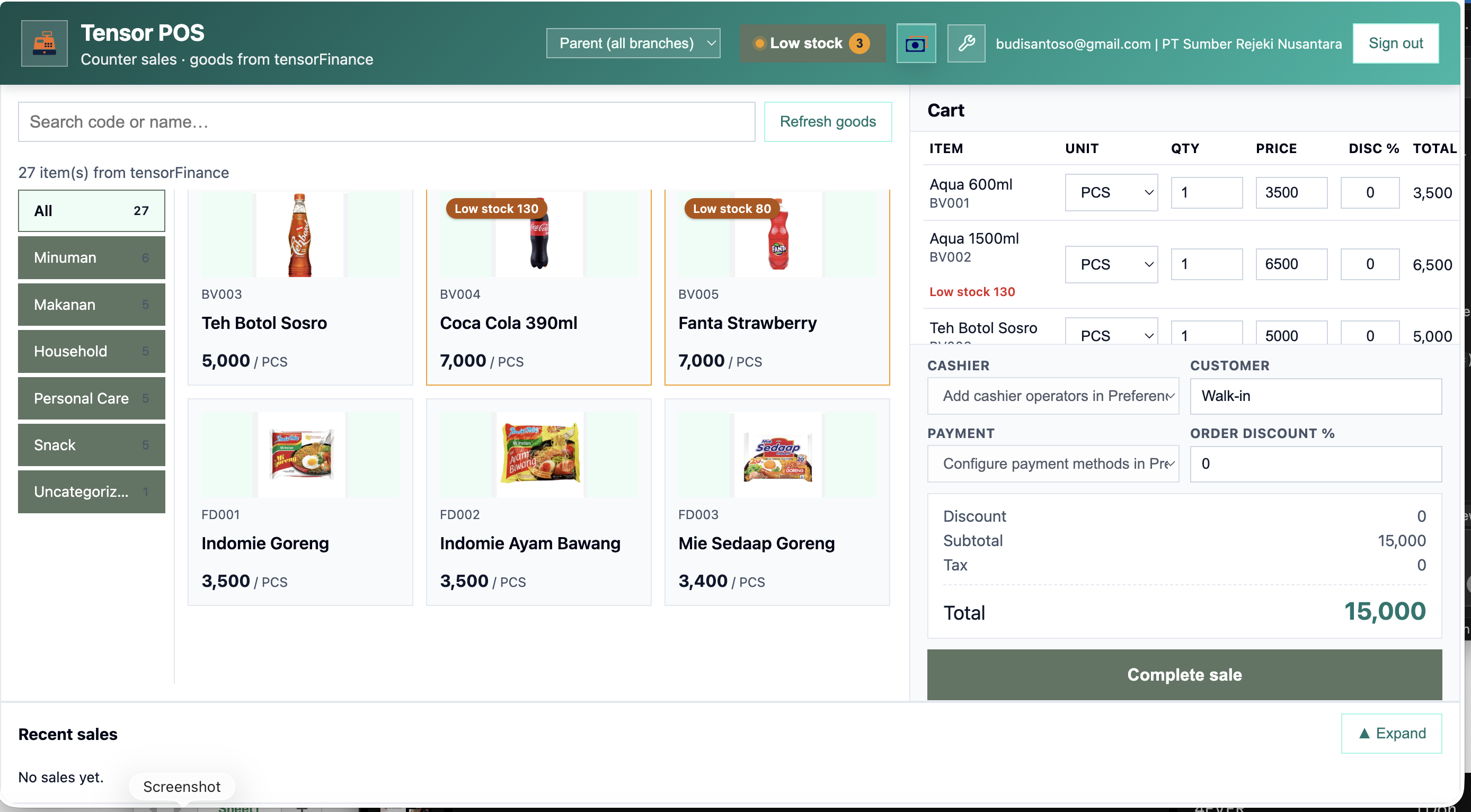
tensorPOS is an easy-to-use yet complete web cashier app: it connects directly to tensorFinance so you can track inventory goods from the Finance catalog, search by code or name, add items by voice (product name + quantity), build a cart with editable qty and price, complete sales with payment methods and optional PPN tax, print 80mm receipts, and easily manage warehouse stock reduction on checkout.
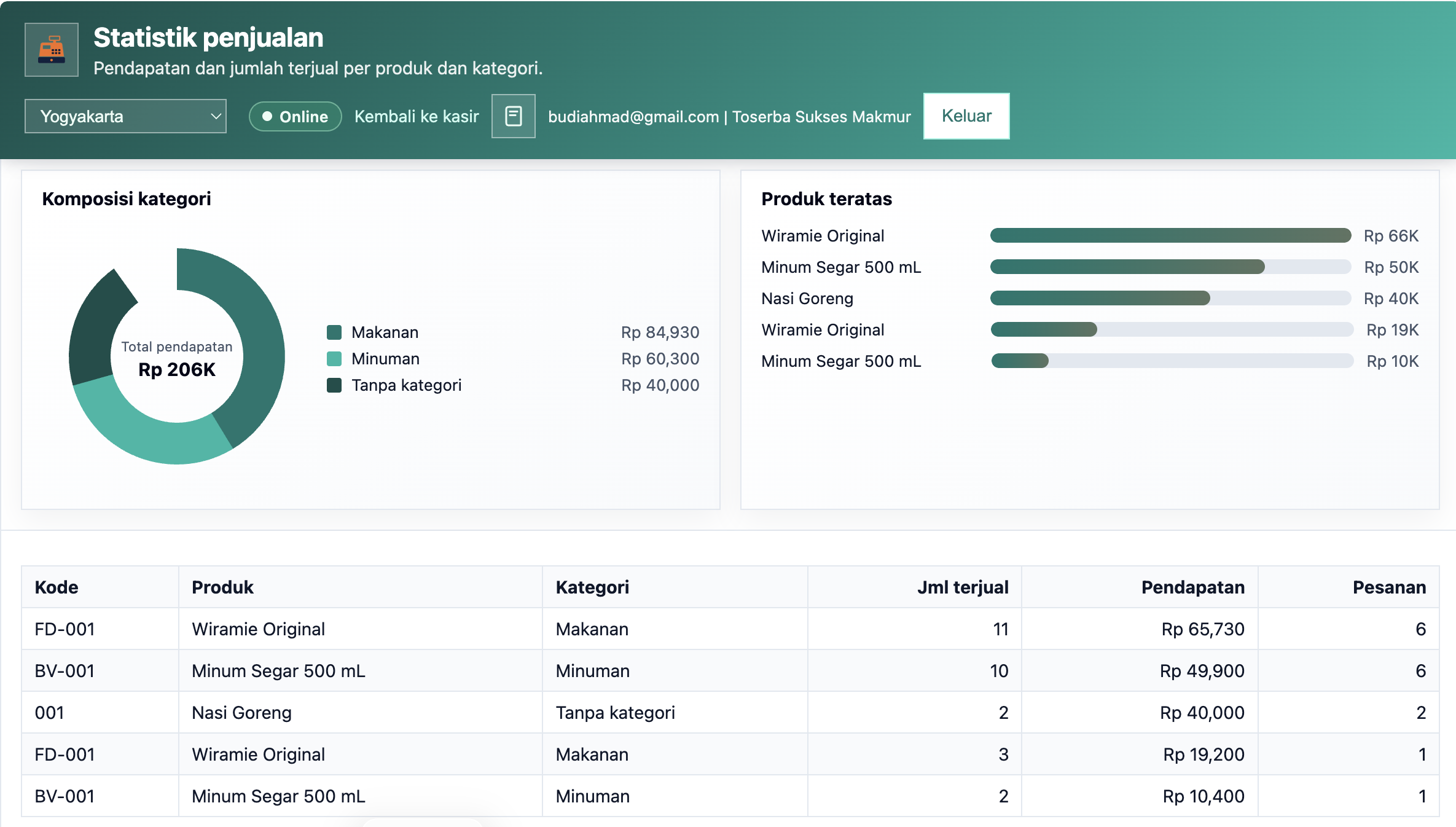
Beyond the counter, tensorPOS also manages customer receivables and supplier payables, post-sale customer feedback (ratings, comments, tips), a points-based loyalty program with redemptions, plus discount presets and promotions applied at checkout — with journal sync and resume summaries. Full English and Bahasa Indonesia UI. Requires Finance license.
Key capabilities
- Finance catalog search and tap-to-add cart
- Voice input — say product name + quantity to add to cart
- Payment methods, PPN tax, and COA mapping
- Warehouse stock check and deduction on sale
- 80mm receipt print and recent sales reprint
- Bilingual English / Bahasa Indonesia
- Finance add-on — pending bridge for journal import
Pricing
Free: 15 transactions / day. Paid: Rp 36,667 / month (list) · Rp 400,000 / year (~9% off).
Product screenshots
Features
POS checkout
- Product catalog from Tensor Finance Goods & Services
- Search by code, name, or category; product images when set
- Voice input — say product name + quantity to add to cart
- Cart with qty, price override, subtotal, tax, and total
- Cashier operator, customer label, and payment method
Customer feedback
- Optional post-sale feedback popup at checkout
- Star ratings, suggested comments, free-text notes, and tips
- Summary of responses, average rating, and total tips
- Recent feedback list by receipt and customer
Loyalty program
- Enable points earned from spending (IDR per point)
- Configure redemption rewards for checkout
- Track customer point balances
- Redeem rewards during POS sales
Discounts
- Create reusable discount presets for the counter
- Apply percent or fixed discounts on sales
- Cloud-synced rules across cashier devices
- Discounts shown on receipts and sale records
Promotions
- Build and manage promotion campaigns for checkout
- Apply promotions without manually rewriting catalog prices
- Promotions appear on receipts and sale history
- Keep campaign offers consistent across operators
Customer receivables
- Record new customer receivable notes for credit/tempo sales
- Collect partial or full payments against open balances
- Track remaining receivable per customer
- Synced to journals and receivables summary on resume
Supplier payables
- Credit purchases create payables linked to suppliers
- Settle open payables with payment entries
- Track remaining payable balances per supplier
- Purchase updates warehouse stock and payables summary
Stock & warehouse
- Sale warehouse selected in Preferences
- Stock validation before checkout
- Automatic stock reduction on completed sale
- Inventory-type goods only (services excluded)
Finance integration
- Each sale writes cashierSaleBridge for Finance GL import
- Payment methods mapped to Cash & Bank COA accounts
- Revenue and tax liability accounts configurable
- Optional PPN tax rate on sale total
- Open tensorFinance link for journal refresh after sale
Receipts & recent sales
- 80mm thermal-style receipt print after checkout
- Reprint from recent sales list (cloud-backed)
- Receipt: date, number, customer, payment, cashier, lines
Preferences & access
- Bilingual English / Bahasa Indonesia
- Cashier operator list; cloud-synced settings
- SSO from tensorFinance and tensorERP
- Shared Cognito sign-in with Finance suite
Who it is for
Retail stores, clinics, pharmacies, and light F&B counters that already run Tensor Finance and need fast counter checkout with stock discipline, credit sales, loyalty, and promotions.
Common use cases
- Retail counter — Tap-to-add catalog items, complete sale, print receipt in seconds.
- Hands-free voice add — Say product name + quantity to add items without typing.
- Loyalty & rewards — Earn points on spend and redeem rewards at checkout.
- Collect feedback — Capture star ratings and comments right after each sale.
- Run discounts & promos — Apply preset discounts and promotions without re-keying prices.
- Credit sales — Issue customer receivables and collect payments without leaving POS.
- Supplier restock on credit — Record credit purchases and settle payables while updating stock.
- Stock-aware checkout — Block overselling; deduct from configured warehouse on sale.
- Finance without re-keying — Import pending POS bridges in Finance Sales or GL.
Frequently asked questions
Can Cashier run without Finance?
Finance license is required; Cashier is an add-on module (checkout also requires Finance on tensorerp.com).
Does tensorPOS support voice input?
Yes — tap the mic on the cashier screen, say a product name and quantity, and matching catalog items are added to the cart. Works in Chrome/Edge over HTTPS with English or Bahasa Indonesia.
Does tensorPOS support receivables and payables?
Yes — customer receivables and supplier payables are built into tensorPOS, including open balances and payment tracking.
Does tensorPOS include loyalty, feedback, discounts, and promotions?
Yes — post-sale feedback, a points loyalty program with redemptions, discount presets, and promotions are all available in tensorPOS.
Do sales post to the ledger automatically?
Sales save immediately and create a pending bridge; open Tensor Finance to import bridges into the general journal.
What languages are supported?
Full English and Bahasa Indonesia — switch in Preferences.
Related articles
Related modules


Tutorials & free resources
Watch step-by-step tutorials and find other free resources on our YouTube channel.
tensorPOS
tensorPOS, receipts, stock, tensorFinance GL bridge